Followers

Showing posts with label MyMemories. Show all posts

Saturday, October 22, 2011

MyMemories Making Cookies

Good afternoon,
I just wanted to show a quick page I made using the MyMemories Digital Software.  I just cannot believe how quick and easy it is to create a page.  Last night my SIL sent me a succession of pictures that showed Bella making Halloween cookies.  Right away I knew I wanted to create a layout with them, but when I do layouts traditionally it takes a while since I need to resize my pictures, (especially when there a lot of them) and then wait to send them to Walgreens to print out.  Then to run into town to get them and by that time, I have no time left to scrap.  LOL  In the MyMemories software there are MANY templates with 1, 2, 3, etc photo layouts.  I chose a layout with multiple photo mats and various sizes and created the layout.  I hope you enjoy...
I added a few "freebie" spiders as a little fun embellishment and the green tag was also a freebie that had some spiders on it.  I stretched it out so you can't tell it's spiders but it gave it a nice accent I think.  Now I do still have a lot to learn about journaling tags and such, but I love all the pictures I was able to add to this layout to create a story line.  Remember, if I am at all inspiring you to go digital I have a promo code STMMMS28873 and this will entitle you to $10 off the software price and also gets you $10 worth of downloads.  Believe me, it's all well worth it.  So head on over to MyMemories store and check out all the fun.  Also, if you "like" MyMemories on facebook there is an exclusive download link every week to get some "FREE" pages and everyone is so super helpful and supportive also.  The MyMemories blog is also very informative and there are video tutorials to help you in almost every aspect of the software.

Monday, October 17, 2011

Bachelorette Party Digital

Good morning


Today is another MyMemories Suite quickie for a challenge they have going here.  The challenge is to create a layout with text wrapped around the pictures.  So first, just to give you a little bit of background...my DD is not crafty.  Now I do not mean that in a mean way at all...she just didn't inherit the "craft gene" from my side of the family.  My mom is a wonderful crafter and dabbles in a lot of different mediums.  My dad does awesome manly crafts.  Both my brothers can draw like no other and even my two boys draw.  Somewhere along the way my poor DD didn't get any ability in that department.  Now, I really don't know if it's not inherited or if she just isn't into it.  She has made some cards and such in the past and they are ok...but she doesn't put her all into it.  So, since I've gotten the MyMemories Digital Scrapbooking Suite I've been creating more and more digital layouts and she is wanting to try some on her own.  To show her how easy it was to create a layout in a matter of minutes I created this page.  Now, I did not add a lot to it as I wanted to show her some simple ways of creating and this turned out pretty cute.  She loved the text around the picture feature and I might have gotten her hooked on joining MyMemories...
I just learned how to do the "wrap around picture text" and literally this
page took about 15 minutes to throw together.  Here is the link to the video tutorials on how to add the wrap around text for the software.  Again, I could have probably added a few more details and worked it a bit more,
but for a quick an easy layout this works for me.

Remember, if I am at all inspiring you to go digital I have a promo code STMMMS28873 and this will entitle you to $10 off the software price and also gets you $10 worth of downloads.  Believe me, it's all well worth it.  So head on over to MyMemories and check out all the fun.  Also, if you "like" MyMemories on facebook there is an exclusive download link every week to get some "FREE" pages and everyone is so super helpful and supportive also.

Friday, October 14, 2011

Happy Halloween Digitally

Happy Halloween

Today I wanted to share a quick post using MyMemories digital scrapbook software.  I tell you what...I am so in love with how quick and easy this is.

A few weeks back MyMemories gave us a freebie Halloween paper pack (so much fun to get free stuff and there is usually something weekly).  So I downloaded it and played around with it.  For the life of me I could not figure out how to get a picture onto the layout.  I'm just learning my digital software so I went onto their site and they have so many AWESOME video tutorials.  I cannot believe how well informed I am getting, hehehehe.  Here is the link to the video tutorial on how to use these types of papers if you have the software.  What, you don't have the software, but want it?  Well then hurry and run over to MyMemories and order the software and be sure to use my CODE STMMMS28873 this will entitle you to $10 off the software price and also gets you $10 worth of downloads.  Believe me, it's all well worth it.

So here is my layout.  This is a Halloween picture of my son a few years back.
This was so easy to create and I love how the journaling worked so well on the bottom of the layout also.  I am starting to really be able to journal more and more on these digital layouts which is also very important.  I do not like my own handwriting so most of my traditional layouts lack a lot of journaling.

Sunday, October 9, 2011

Lasting Memories #59 "Tag your it"


Good morning again for another challenge at Lasting Memories.
This week's challenge has to do with tags...
Now I have to tell you, since I've received MY Memories digital software I have NOT done much traditional scrapbooking...I'm having so much fun with the software.  I promise, I will be showing off some traditional soon as I have a plan....but I just can't post the reason behind my (in)sanity quite yet.  So, I wanted to see how quickly and easily I could make a page adding some tags to it and this is what I came up with.
Isn't this just adorable.  I love how these packs coordinate so well.  This is the Fleur De Lis set and it's wonderful.  I am having so much fun experimenting and the one thing I've learned so far is experimentation doesn't cost a thing.  I did this layout in 3 different styles and love this one the best.  No waste of paper or embellishments, because that has happened to me.  Plus, I can scrapbook digitally while still watching the news...LOL.  I definitely cannot scrap traditionally while watching tv.

So I hope you've enjoyed my layout this week and hope to show you some more digital and traditional layouts.  Remember, if you are at all interested in going digital, I have this code 
                          STMMMS28873 and you can go here and use it to get 
$10 off and $10 worth of downloads.  


SO, I had a giveaway on my blog a few weeks ago and the winner never contacted me, so
do you want to try Digital Scrapbooking?  
There are a few rules though
1.  You need to go to MyMemories and check out their fun layouts and 
digital paper packs and then come back here and COMMENT which one you liked the best.  
DOING this will get you 1 entry.  Now for extra chances you can:
2.  Go to their Blog and become a follower
3.  Like them on Facebook
4.  Follow on Twitter
Now you do NOT have to do all of these things, but the more you do and comment telling me you've done each thing separately, the better the chances are for you to win it. 4 chances per person...
BUT if you post my giveaway on your blog, fb, twitter or any place you can think of and you come back here and comment telling me what you did, I will give you that MANY more entries, so it is completely up to you on how many chances you want

I will be announcing the winner OCTOBER 16th during my Lasting Memories challenge.

Sunday, October 2, 2011

Lasting Memories #58 Recipe with a Twist"

Good morning again for another challenge at Lasting Memories.
It's all about a Recipe with a little "Twist"
Now Karen challenged us with this recipe:
1 Photo
2 embellishments
3 colors
and the twist:  A song for the title
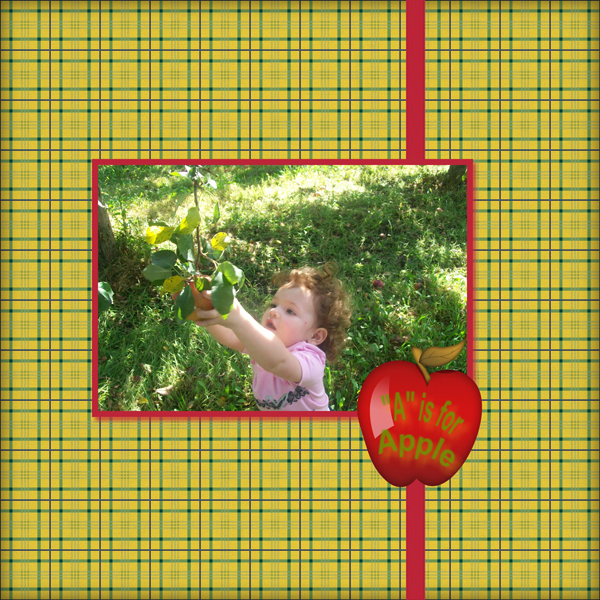
and this is what I came up with using my NEW
MyMemories digital software.
I used:
1 photo of Bella at the Apple Orchard from last weekend
2 embellishments - the Apple (added word art from software) and the ribbon
3 colors and I chose yellow, green and red to adapt to the photo
and the song: "A is for Apple" seemed to fit
All this comes in the software package.  I didn't purchase anything.
I wanted to see if I could truly use the software as is, or if I 
had to purchase anything and it's a dream come true.  I love how I can add titles directly on an embellishment, pick just the right color combo and make it as simple or complex as I want.  I am in the process of learning how to add music to my layouts also...so excited!!!
Now I hope you've enjoyed my digital pages this week and now onto the winner:

Miranda said...

I became a follower of MyMemories Blog!

Congratulations Miranda.  Email me your email address at burffrau @ aol dot com as soon as you can so I can send your information to MyMemories and they will send you the codes for the software.


Now if you didn't win and are still interested in purchasing the software, remember I have this code that allows you $10 off the price of the software and $10 worth of free downloads.  Copy this code STMMMS28873 and enter it here

Saturday, October 1, 2011

Digital Layout and giveaway

Good morning,

I just wanted to remind you of the giveaway for the MyMemories digital software.  If you don't remember, or didn't see the post, they approached me a couple of weeks ago and asked if I would be interested in using it and then blog about it.  I had been thinking of trying digital because I wanted to make a Christmas present of a project.  Well here is another layout I created and it was so easy.  In fact, I am really liking how easy it is to put together.  You have so many choices but it isn't overwhelming.  I was a bit intimidated at first learning the software and all, but it isn't bad at all.
These pictures were taken when we went on a family trip to Steve's parents.  They had a bald eagle's nest in the back 40 as I call it.  I wanted the pictures to really be the focus in this layout and I think I achieved that very well.  Clean and simple...now the other reason I really like going digital is my journaling.  I hate my own handwriting, but I do know it's important to journal.  Now I can say as much or as little and it looks great.  I also know that preserving your own handwriting is important, but going digital will allow for me to really keep up my journaling and not "hide" it or not do it at all, which I have tended to do.  SO let me know what you think of my layout and:

Do you want to try Digital Scrapbooking?  If so, I am going to give away 1 subscription to this software.
YEAH,!!! RIGHT?
so there are a few rules though
1.  You need to go to MyMemories and check out their fun layouts and 
digital paper packs and then GO here and COMMENT which one you liked the best.  
DOING this will get you 1 entry.  Now for extra chances you can:
2.  Go to their Blog and become a follower
3.  Like them on Facebook
4.  Follow on Twitter
Now you do NOT have to do all of these things, but the more you do and comment telling me you've done each thing separately, the better the chances are for you to win it. 4 chances per person...
BUT if you post my giveaway on your blog, fb, twitter or any place you can think of and you GO here and comment telling me what you did, I will give you that MANY more entries, so it is completely up to you on how many chances you want

I will be announcing the winner OCTOBER 2nd during my Lasting Memories challenge because I have the cutest layout ready for that day using...of course, the MyMemories Suite.

Now, if you DO not want to try to win the software and want it NOW I am giving you a the ability to save $20 if you wanna purchase it NOW here  and enter this coupon code: STMMMS28873

YOU DO NEED TO GO HERE TO COMMENT THOUGH TO BE ELIGIBLE TO WIN THE SOFTWARE

Sunday, September 25, 2011

Lasting Memories #57 Flowers and Frames

Happy Sunday all,


Today over at Lasting Memories it's all about Frames and Flowers...2 of my most favorite things.  I chose a picture of my mom that is one of my favorite.  My mom LOVES her flowers and her garden.  Most of the time you can find her just sitting outside enjoying her beautiful yard.  Now be prepared
this is a VERY busy and loud layout
All the cuts are using the Storybook cricut cartridge.
I forget how much I love using some of my carts.
I also took MOST of the color out of the photo
and highlighted just the pink and blue flowers.
I framed my mom's picture with some sheer ribbon
around the backside of the photo and twisted
it at the corners...I saw this technique in a 
magazine a while ago and kinda like it
I mimicked the iron work trellis in her yard 
and added one behind the vines and flowers.
I only chalked the inside of the flowers
and added a bit to the vines and leaves.

I do really like the look of this page even though it's very busy.
Now, remember to join us at Lasting Memories and create a layout using flowers and frames.  
Summer is almost gone, but you can preserve it with a beautiful flower layout.

Also, don't forget about the MyMemories contest I am holding here.  Be sure to check out all the details and leave your comments over there.  Only the comments posted there will qualify you to win a Digital Software program from MyMemories.  Next week I will be showing you a digital layout I made for my Lasting Memories challenge.  If you have ever wanted to play around with digital this is a great way to learn.  Now, if you DO not want to try to win the software and want it NOW I am giving you the ability to save $20 if you wanna purchase it NOW here  and enter this coupon code: STMMMS28873

Friday, September 23, 2011

I've gone digital

Good afternoon all,


+++If you are looking for my "festive fridays" card or my LTC cards, please scroll down+++


Okay, so here's the scoop...you all know how much I love to scrapbook...that's how it all started.  I've been scrapbooking for MANY years and then that evolved into card making and then that evolved into buying a cricut, then I upgraded to the expression, then I found my passion for the ecraft, etc.  Now recently I have been seeing ALOT of digital layouts and just love the idea of them, BUT with being unemployed I've NOT had the means to go out and purchase a program.  SO I did the next best thing...I entered to win a program.  I didn't really care which program because I just wanted to play and see if I even liked it.  I did download a couple of freebie trials, BUT you are very limited in what you can make, so I was a bit dissatisfied with them
 :(  Well, I did NOT win at any of the places I tried...


BUT a couple of days ago I was approached by MYMemories and was offered to try their digital software for scrapbooking.  Well yeah of course I am willing to try it...so I downloaded it and guess what?
Seriously, NO LIE, 5 minutes.  I think the hardest part
was finding which pictures to plunk in.  
Now this was a template and I did delete a few
things from it, but that's cuz it was a bit too
girlie since I had pictures of Austyn in the layout also,
but that's what I LOVE about this...I can mix and match,
add, delete, oh my
SO, now the fun part...
Do you want to try Digital Scrapbooking?  If so, I am going to give away 1 subscription to this software.
YEAH,!!! RIGHT?
so there are a few rules though
1.  You need to go to MyMemories and check out their fun layouts and 
digital paper packs and then come back here and COMMENT which one you liked the best.  
DOING this will get you 1 entry.  Now for extra chances you can:
2.  Go to their Blog and become a follower
3.  Like them on Facebook
4.  Follow on Twitter
Now you do NOT have to do all of these things, but the more you do and comment telling me you've done each thing separately, the better the chances are for you to win it. 4 chances per person...
BUT if you post my giveaway on your blog, fb, twitter or any place you can think of and you come back here and comment telling me what you did, I will give you that MANY more entries, so it is completely up to you on how many chances you want

I will be announcing the winner OCTOBER 2nd during my Lasting Memories challenge because I have the cutest layout ready for that day using...of course, the MyMemories Suite.

Now, if you DO not want to try to win the software and want it NOW I am giving you a the ability to save $20 if you wanna purchase it NOW here  and enter this coupon code: STMMMS28873

Now, I've not had a chance to play with this a whole lot, but I'VE already created some more FUN projects, not just layouts and will be sharing them with you very soon, so please keep coming back.